Your project, your codebase, is the whole context for your AI.
Manage that context well. Lantern will help you with that.
Lantern maps your project, helps you plan changes, reviews pull requests with generated flows and local review, and keeps your AI assistant sessions together in one desktop app.
Lantern draws your project as a graph from a .lantern/ folder that records each file’s role, purpose and relations, so you can see its structure without reading the code. The Macro view groups the same map into areas.
Scroll or pinch to zoom · drag to pan · Enter dives in · Esc steps outOverview · 100%
Outside systemsmail-relay 2tide-feed 3map-tiles 1
1234
Fig. 2 The Macro view shows the map as areas instead of files.
An area of features; Enter dives in, Esc steps out.
A pull request lights the areas it touches, with how many of their files changed.
Plumbing several features share, kept out of the areas.
The outside systems the code talks to.
Reviews and flows
Review changes you can actually read
Open a pull request to read its changed files in review order, each with a reason and a diff, next to the graph with the touched files marked. Local changes get the same view, and a flow shows what the change does for people.
Fig. 3 Read a pull request in review order, with a reason for every file.
Work down the review order; each file says why it changed.
Pick a file to read its diff under that reason.
The map shows where the changed files sit.
Fig. 4Local review
Scroll the figure sideways →
Compare changestidewater
BaseWhat the changes are measured againstBranch mainCommitLatest — follows the branch tip 9f3c2a1
⇄
CompareThe changes you want to reviewBranch feat/tide-alertsCommitWorking tree On feat/tide-alerts, with your uncommitted edits
Working tree vs main5 files+48−12CancelReview
Localmain → working treefeat/tide-alerts compared with where it left main
Write reasons for 5 files
Review order 5
1~src/ui/AlertForm.tsxno reason
2~src/ui/useAlerts.tsno reason
3~src/data/alerts-repo.tsno reason
123
Fig. 4 Review uncommitted work, or a branch with no pull request, the same way.
Pick a branch, a commit or the working tree on each side.
Files and lines changed, counted before the review opens.
One click asks Claude for a one-sentence reason per changed file.
Fig. 5Flows
Scroll the figure sideways →
a · Reading
b · A step picked
12345
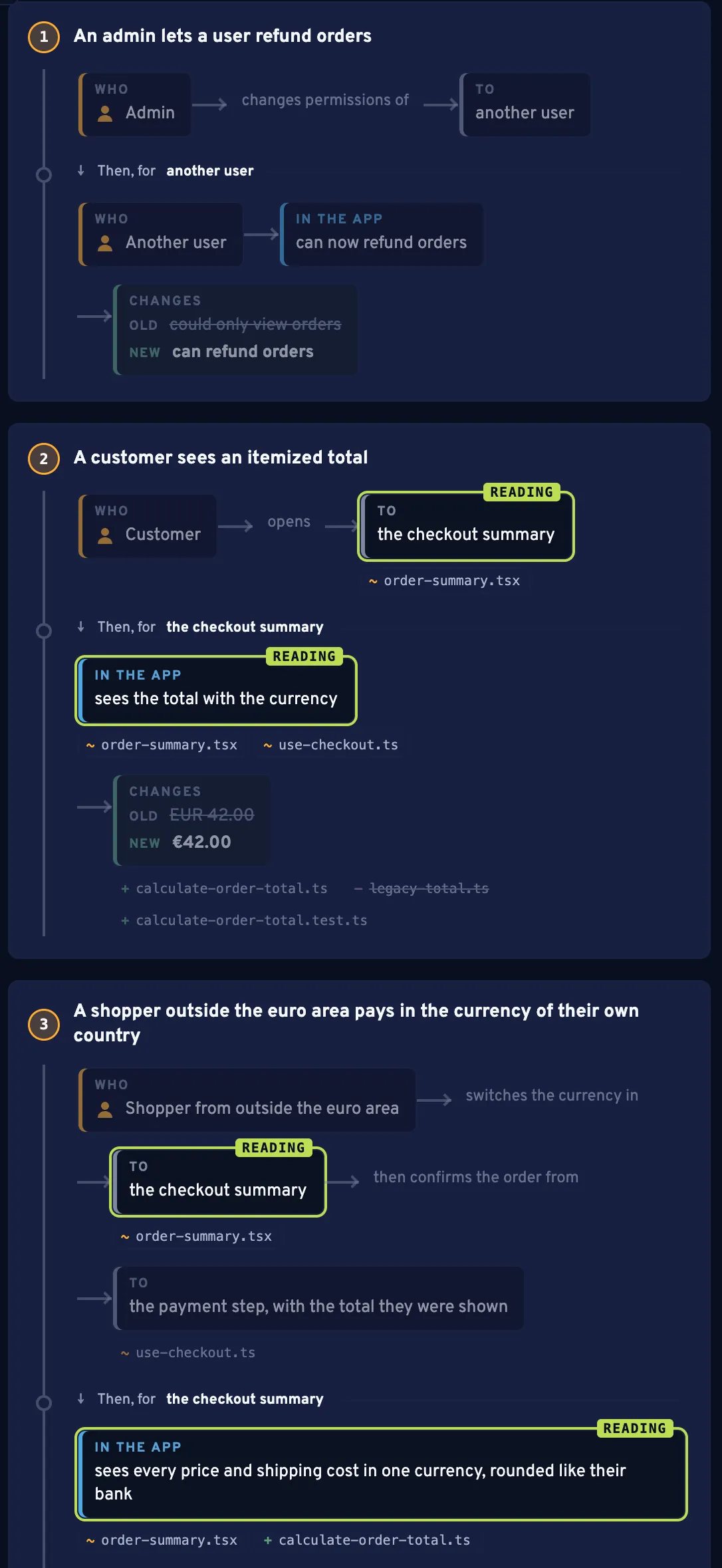
Fig. 5 A pull request’s flow, read from its record: what the change does for people, one track per story.
Each story of the pull request gets its own numbered track.
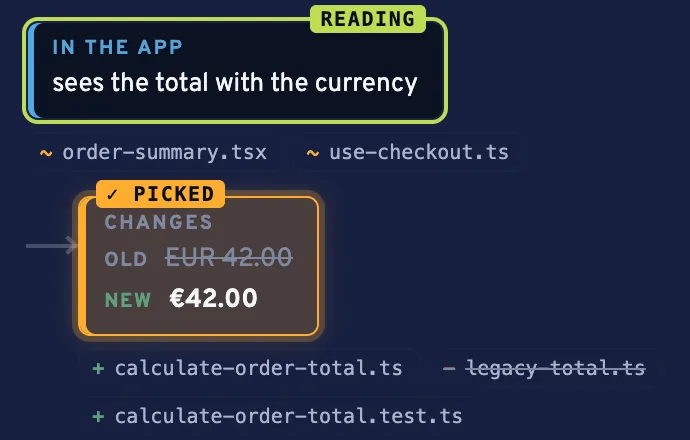
Blocks by kind: Who, Does, To, In the app, and Changes with the old and new value.
Under a step, the files it touches: + added, ~ modified, − removed. Click one to open it.
READING marks the steps that mention the file open in the review pane.
Pick a step to mark its files in the list, the graph and Macro; Esc clears.
Plans and progress
Plan before you delegate
The lantern-plan skill writes a plan with stages, open questions and approvals, and Lantern shows it next to the map. As the work lands in pull requests, each item moves from in progress to implemented to verified.
Fig. 6Planning
Scroll the figure sideways →
PlanningExit full window
✓ approvedtide-alerts, opened 2026-10-28Copy plan text
Warn when the tide passes a threshold3 of 6 items implemented · The plan was approved by jun on 2026-10-29.
1 of 2 questions answered Nothing to copy yet. Click a question to answer it.Copy for the agent
Goal
A user is told when the tide at a saved station passes their threshold.
Stages
▸s1Store thresholds✓ done✓ approved
2 done
▾s2Send alerts✓ approved
1 done 1 in progress 1 planned
Questions
s2.q1 Should an alert repeat while the tide stays high?jun: No, once per crossing.
s2.1Check each reading against the thresholdsimplemented
Done when: A reading above a threshold yields one alert.file src/domain/alert-rules.ts#43 merged
s2.2Send the alert by mailin progress
Done when: The mail names the station and the height.file src/data/mail-gateway.ts#42 open
s2.3List the sent alertsplanned
Done when: The alert list shows the last ten alerts.
▾s3Quiet hours⊗ blocked○ pending
Waiting for an answer to: s3.q1
Questions
s3.q1 Which hours count as quiet?? unanswered
1234
Fig. 6 The lantern-plan skill writes the plan; Lantern shows it next to the map.
The plan’s state, its progress and who approved it.
Open questions block their stage; click one to answer it, then Copy for the agent.
Items turn in progress, implemented or verified from the pull requests recorded for them.
The areas the plan names, marked on the map.
Sessions and notifications
See every session
Lantern lists your projects and the AI assistant sessions running in them, each with its state and last reply. It tells you in the menu bar and with a notification when a session finishes, needs approval or is waiting for input.